Roblox Marketing Web
Building an AI Workflow System — Giving Designers a Coding Superpower
Designed and built a three-layer AI workflow system embedded in the web monorepo. A content brief now becomes a near-production page proposal in a single AI session, with design system compliance enforced structurally — not by memory.
Role
Senior Web Engineer
Company
Roblox
Design / Tech Tooling
Claude Code, Cursor, TypeScript, React, SCSS, Anime.js
Year
2026
The Challenge
Description
Every new page moved through a long brief → build → design review loop. AI tools promised to shorten it, but without reliable context they produced code that drifted from the design system — adding review rounds instead of removing them, and slowing speed to market.
- Long design review cycles — each prototype needed multiple rounds of correction, stretching simple page requests to 1–2 sprints
- AI tools lacked a single source of truth — output drifted from design system tokens and components, so it couldn't be trusted to shorten the loop
- Quality depended on individual familiarity with conventions, not structural enforcement
The Approach
Crafting Solutions
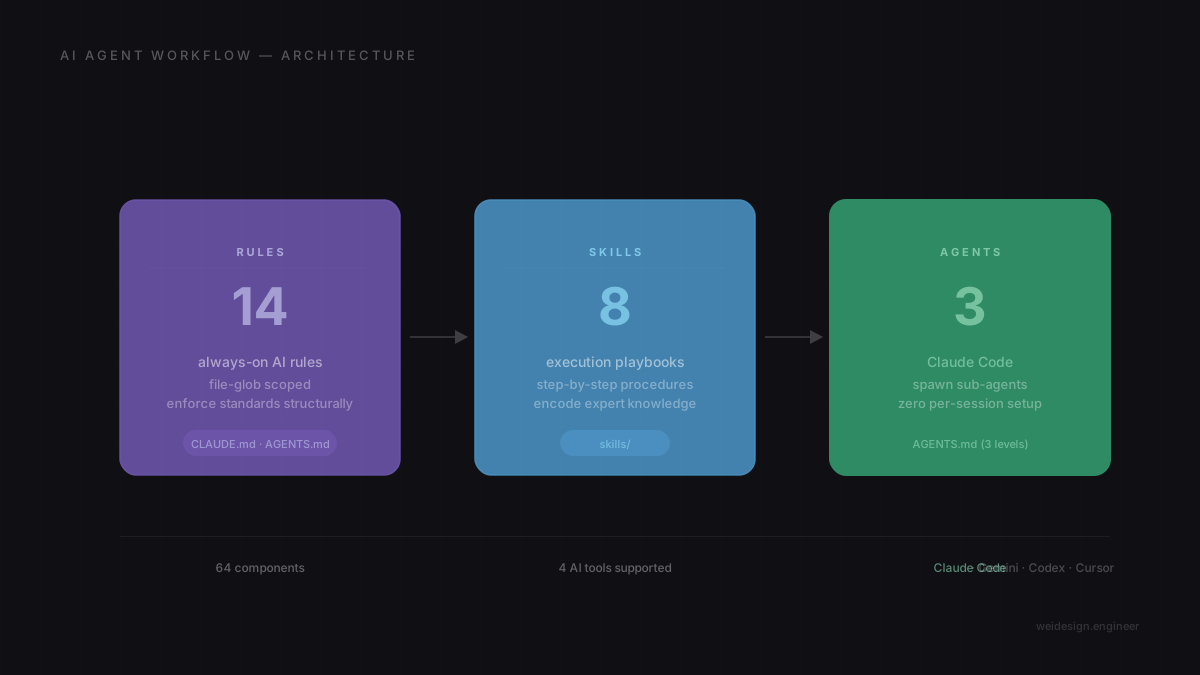
The insight was that AI tools aren't inherently unreliable — they're context-hungry. Given the right structure, they produce trustworthy output. I designed and built a three-layer system embedded directly in the monorepo — working closely with the design team to understand how they'd actually use it — built around Rules that always run, Skills that encode how to execute specific tasks, and Agents that adapt behavior automatically by working directory.
- Rules layer — constraints encoded at the file-glob level so the AI can't produce structurally wrong output, regardless of who's prompting or how
- Skills layer — execution playbooks that encode how a senior engineer approaches recurring tasks: page scaffolding, scroll animation, component promotion, design system evaluation
- Agents layer — AGENTS.md files at three directory levels that automatically shift AI behavior by working context, eliminating per-session setup overhead entirely
- DESIGN.md — a machine-readable brand brief that loads into every AI session as a single source of truth for visual direction and token conventions
Rules
14
always-on rules
- Component architecture
- SCSS token enforcement
- Import patterns
- Animation contracts
- Bundle optimization
CLAUDE.md · AGENTS.md Skills
8
execution playbooks
- playground-page-generator
- scroll-animation
- design-system-taste
- component-promotion
- bug-fix
skills/ Agents
3
context levels, zero per-session setup
- Monorepo root
- Playground app
- UI package
AGENTS.md (3 levels) Key Metrics
A repo-native system that scales with the codebase — more components, more rules, stronger guarantees. Works across four AI tools without vendor lock-in.
4
AI tools supported — Claude Code, Gemini, Codex, Cursor
1
AI session to prototype a page from a content brief
Same day
Cycle time from brief to proposal — was 1–2 sprints
DESIGN.md — the single source of truth for visual direction, loaded automatically into every AI session across all four tools. Content shown is representative, not the internal file.
# Design brief (canonical)
Single entry point for visual and brand-aligned UI work.
Loaded by every agent that reads repository context.
## 1. Visual theme and atmosphere
- Mood: Bold, confident, structural — typography carries the visual weight.
- Canvas: Default to dark marketing surfaces.
- Layout: Full-bleed immersive sections, strong type hierarchy, purposeful asymmetry.
## 2. Color palette and roles (tokens first)
Authoritative values live in SCSS abstracts. Use semantic tokens in code.
Do not hardcode hex or rgb when a token exists.
The Outcome
Measuring Success
The system changed the default from 'AI produces inconsistent output that developers clean up' to 'AI proposes, team approves.' Design system compliance became structural — enforced at the rules layer, not dependent on who happens to know the conventions.
- I can take a content brief and produce near-production component composition in a single AI session — giving design something concrete to react to and adjust, rather than waiting for a full build
- Developers shifted from building from scratch to reviewing and approving structured proposals — cycle time dropped from 1–2 sprints to same day
- Standards travel with the work, not with the person — junior developers produce structurally equivalent output to senior developers who know conventions by memory
- The system is actively growing — new agents and skills are being added as the team's workflow expands, and each addition makes the output more precise without resetting context